
T3
Colour

Colour #1: The RGB Cube

rgb(128, 128, 128)
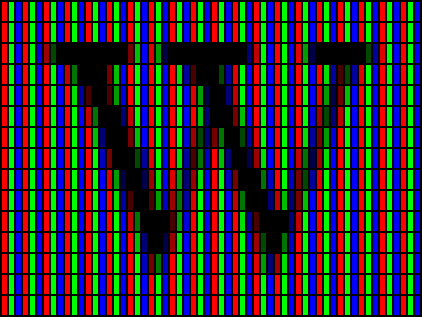
A capital W rendered with ClearType, enlarged until the individual red, green and blue subpixels of each screen pixel are visible.
Michael Geary, public domain
A glacial lake at sunrise, mirror still, with snow-streaked mountain peaks lit warm above a dark band of pines, and turquoise water running clear over pale stones.
publicdomainpictures.net, CC0

Every colour on your screen is three numbers

Your screen makes colour by mixing three lights: red, green and blue, each ranging from off (0) to full (255 or 1, depending on what the vibe is). Every colour you see is a combination of those three numbers.

Black is when all the dials are set to 0, white is when they are all set to 255, and every other colour is somewhere in between. The three numbers are called the RGB values of the colour.

Three dimensions make a cube

We can take each of the three numbers and use it as a coordinate in a three-dimensional space. The red value is how far along the x-axis we go, the green value is how far along the y-axis we go, and the blue value is how far along the z-axis we go.

This forms a cube, where each point in the cube corresponds to an RGB color your screen can display.

The corners have familiar colours

In each cube’s corner, all of the RGB values are either completely off or completely full, making those colors very distinct from one another. In fact, the corners of the cube are exactly all the primary colours, secondary colours, as well as black and white.

The primary colours are the red, green and blue we picked out earlier, the secondary colors you get by mixing two primaries together, and black and white are the extremes of all three colors being off or on.

A line segment through the cube is a gradient

A gradient is what we get when we smoothly transition from one colour to another. Typically, this is achieved via linear interpolation.

Say your two colors have red channels 10 and 70, and you want to linearly interpolate between 10 and 70 via a “knob” that goes from 0 to 1. Then the formula goes:

red = knob * 70 + (1 - knob) * 10

Basically: Take knob percent from the second colour, and the rest from the first colour. Do the same for green and blue, and you have a gradient.

A line segment through the cube is a gradient

We can interpret this geometrically, too: A gradient is just a line segment through the RGB cube, where the two endpoints are the two colours we want to transition between. Each point along the line segment corresponds to a colour in the gradient.

The linear interpolation formula from before is just a way to find the coordinates of a point along that line segment.

Screens actually work like this

Your screen is made up of a grid of pixels, and each pixel is made up of three or more subpixels, consisting of LEDs that emit red, green and blue light. They are small enough and far enough away that your eye blends them together, and you see a single colour.

If you are able to defocus your eyes really hard, you can make the image above blur into a single grey color; squinting helps too. It’s a bit like you’re lowering your eye’s resolution to 360p!

The real world does not

When you look into the sun (please don’t) or even manmade light, you will never see subpixels like this. The sun emits spectral light — it’s the real thing that screens can only ever approximate.

Light is photons, and photons have a wavelength, and the wavelength determines the colour — the fact that just three wavelengths of light (red, green, blue) can be mixed to approximate all the other colours we see is a fascinating quirk of our eyes, which, along with the physics of light, we will explore in the next few posts!